KalshiTrade history
Kalshi trade history: every export, and what each leaves out.
As of October 8, 2026, Kalshi gives you your trade history three ways: a yearly P&L download of closed lots, an activity export of orders, trades and settlements for any dates, and an API that splits your fills at a moving cutoff. None of them carries a December 31 price for a position still open; the API’s daily candles do.
By Owen Monagan, Founder & CEOUpdated From Kalshi’s app, its API docs and our own reads
Kalshi trade data at a glance
Checked October 8, 2026- What the P&L covers
- Realized profit and loss from closed positions, including fees and any credits or rebates Source
- P&L download
- A zip of one CSV, realized_pnl_<start>_<end>.csv: one row per closed lot, plus a row for each credit Source
- Activity export
- Your activity page: All time to Custom dates, saving Kalshi-Recent-Activity-All.csv with 25 columns of orders, trades, settlements, deposits, withdrawals and credits Source
- Fill history
- Fills before a moving historical cutoff are served only by GET /historical/fills; the live window’s length is not published Source
Compare
What each source covers.
Two files from the app, four parts of the API. Each answers a different question.
| Source | Where | Covers | Leaves out | Money in |
|---|---|---|---|---|
| P&L download | Documents, per year | Closed lots, FIFO, with fees; credits as rows | Open positions; years without closed positions | Dollars, 8 decimals |
| Activity export | Your activity, any dates | Orders, trades and fees, settlements; columns for deposits, withdrawals and credits | Lots, basis, any matched profit | Dollars and cents, by column |
| API fills | /portfolio/fills and /historical/fills | Every fill, price, count and fee | Credits; the older half if you read one endpoint | Dollar strings |
| API settlements | /portfolio/settlements | Result, contracts held, cost, payout, fees | Anything archived; there is no historical twin | Revenue in cents, the rest in dollars |
| API positions | /portfolio/positions and /historical/positions | Per market: realized profit and loss, fees | Individual lots and dates | Dollar strings |
| Daily candles | /series/…/candlesticks, 1440 minutes | A daily close per market, December 31 included | Days the market did not trade | Dollar strings |
None of these is a tax form, and Kalshi says it does not report profits or losses to the IRS. There is no IRS guidance on how event contracts are taxed, and which file a return needs depends on the route it uses: a closed-lot list covers standard capital and gambling, while Section 1256 also counts what was still open at year end, which only the fills and the daily candles together can rebuild.
Activity export
The Your activity CSV export.
A ledger of everything that moved in the account, for any range of dates.
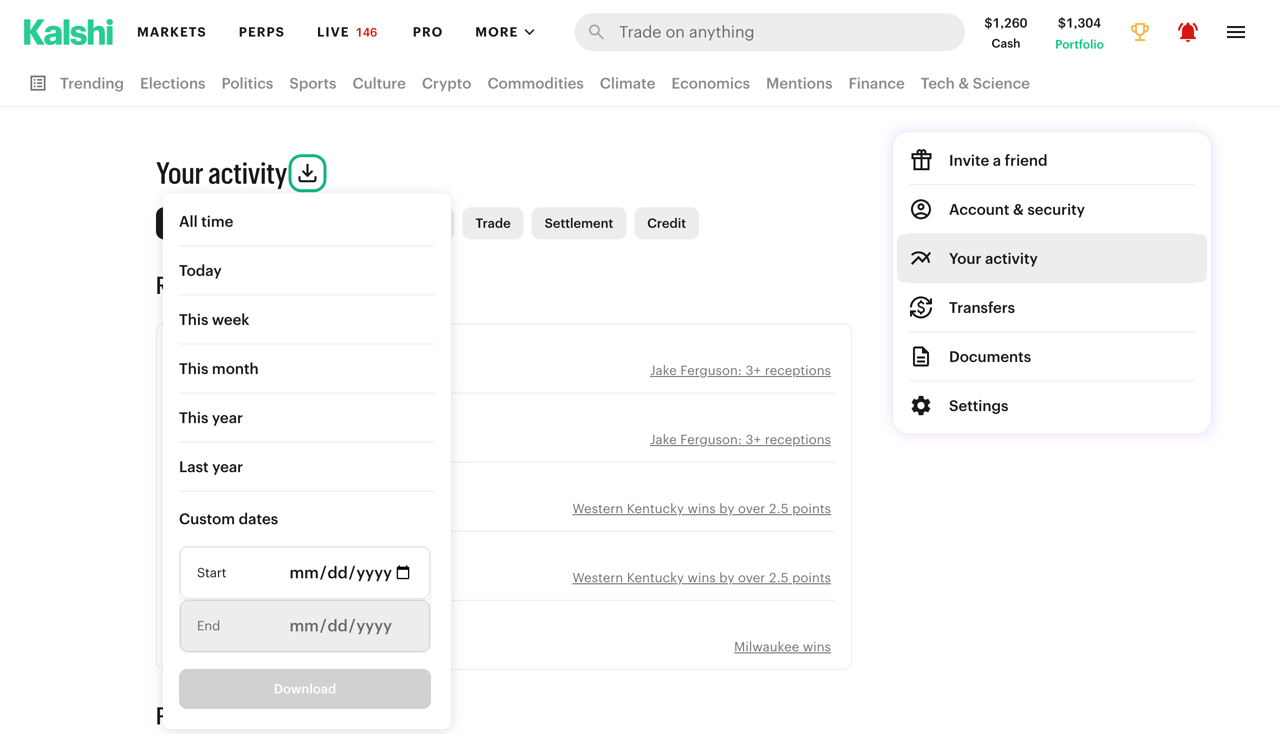
Your activity sits in the same account menu as Documents. Its download icon offers All time, Today, This week, This month, This year, Last year and Custom dates, and saves Kalshi-Recent-Activity-All.csv; the suffix follows the filter chip selected on the page. The file has 25 columns, among them Fee_In_Dollars, Direction, Price_In_Cents and, on settlement rows, the YES and NO contracts held with their average prices and Profit_In_Dollars.
It is the file that carries the opening trades of positions still open, which the P&L download leaves out. It does not match lots or compute basis, and its money arrives in two units: fees and amounts in dollars, trade prices in a column named for cents. The file is built in the browser from requests capped at 10,000 trades and 1,000 settlements per range; we have not tested an account over those counts.
- Activity export
- Your activity page: All time to Custom dates, saving Kalshi-Recent-Activity-All.csv with 25 columns of orders, trades, settlements, deposits, withdrawals and credits Source
- Activity rows
- Orders, trades with their fee, and settlements with contracts held and profit; columns for deposits, withdrawals and credits Source
- How it builds the file
- In the browser, from requests for up to 10,000 trades, 10,000 orders and 1,000 settlements in the range Source
P&L CSV
The Kalshi P&L CSV, column by column.
One zip, one CSV, one row per closed lot.
Each year on the Documents page has a download icon. It saves a zip named for the year’s dates holding one file, realized_pnl_2026-01-01_2027-01-01.csv for 2026. On the account in our capture, the rows sum exactly to the page: $14.60 with fees and $136.93 without, so $122.33 of fees in the year. Five rows from that file, account id removed:
| type | quantity_fp | entry → exit | open fee | P&L no fees | P&L with fees | |
|---|---|---|---|---|---|---|
| KXOSCARPIC-26-ONE | trade | 6.00 | 0.78 → 1.00 | 0.0800 | 1.3200 | 1.2400 |
| KXFOMEN-26-COB | trade | 19.78 | 0.24 → 0.00 | 0.2526 | -4.7472 | -4.9998 |
| KXWCROUND-26FINAL-NED | trade | 1.38 | 0.12 → 0.00 | 0.0103 | -0.1656 | -0.1759 |
| KXWCROUND-26FINAL-NED | trade | 34.94 | 0.13 → 0.00 | 0.2767 | -4.5422 | -4.8189 |
| (blank) | credit | 0.00 | 0.00 → 0.00 | 0.0000 | 5.0000 | 5.0000 |
What the rows show, read off the file:
- Settlements look like sales. A market that resolved appears as an exit at 1.00 or 0.00 with no close fee, because Kalshi charges no settlement fee.
- One position can be two rows. The two KXWCROUND rows share open and close times but not an entry price: each price is its own lot, with its own share of the fee.
- Counts and fees are fractional. 19.78 contracts, a 0.2526 fee. Rounding each row to cents before adding moves the total.
- Credits are not trades. A credit row has no ticker, no side and quantity 0, and its amount sits in both profit columns. This file carries a +5.00 credit and a later -5.00 reversal.
- Not every year gets a row. The account in our capture has 1099s for 2024 and 2025 and one P&L row, for 2026, its one year with closed positions.
- P&L CSV columns
- 13: type, quantity_fp, market_ticker, side, entry and exit price, open and close fees, profit with and without fees, close and open timestamps, and a subtrader id Source
- Years listed
- Years with closed positions: the account captured had 1099s for 2024 and 2025 and one row, for 2026 Source
Fills
The API: your fills sit on two sides of a cutoff.
The trap that truncates a year without an error.
Kalshi’s Get Fills reference says it in one sentence: “Fills that occurred before the historical cutoff are only available via GET /historical/fills.” Its Historical Data page gives the mechanism. GET /historical/cutoff returns one timestamp per data type, the fills one in trades_created_ts, and the cutoffs are “regularly updated, advancing forward over time.”
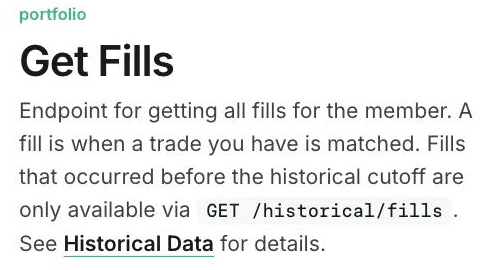
Passing min_ts=0 to /portfolio/fills does not reach past the cutoff; it returns the live tier and stops. Kalshi does not publish the window’s length. On the accounts Realize reads it has run about two to three months, so a year read from one endpoint is missing most of itself. The fills that fall through are the oldest ones, often the purchases behind positions still held, so the gap removes cost basis first.
- The tell: a market with a settlement and no fills. The settlement survived; the opening trade did not.
- The gap after a pause: a pull that stops for longer than the window misses the fills that crossed the cutoff while it was stopped, unless the next run compares its last sync with the current cutoff rather than with the last fill it saw.
- The fee: every fill carries
fee_costin dollars, the figure the Kalshi fees formula produces.
- Fill history
- Fills before a moving historical cutoff are served only by GET /historical/fills; the live window’s length is not published Source
Settlements
Settlements, positions and what the archive keeps.
The settlement record has no archived copy. The result does.
GET /portfolio/settlements returns only settlements still in the live data set, and Kalshi’s Historical Data page says “there is currently no historical endpoint with the same settlement-record fields.” Once a market ages out, its settlement row is gone from the API. Two things survive: GET /historical/positions, with each market’s position, realized profit and loss and fees, and GET /historical/markets, with the market’s result and settlement_ts.
The units change inside one record. In Kalshi’s Get Settlements reference, revenue is an integer number of cents, while fee_cost, yes_total_cost_dollars and no_total_cost_dollars are dollar strings. A script that subtracts cost from revenue without converting is off by a factor of 100.
The two position endpoints also make a check on a fill-built figure: the realized profit and loss of /historical/positions before the cutoff plus /portfolio/settlements after it. On one account that sum came to -$181.93, matching Kalshi’s own figure for the same trades to the cent. Credits sit on no endpoint, so this figure and any figure built from the API stay below Kalshi’s headline by the account’s credits.
Units
Units, precision and direction.
Four fields that produce a plausible wrong number when read loosely.
| Field | Unit | Trap |
|---|---|---|
count_fp | Contracts, 2 decimals | Fractional; the smallest unit is 0.01 |
yes_price_dollars | Dollars, up to 4 decimals | Sub-cent ticks on some markets |
fee_cost | Dollars | The same name on fills and settlements |
revenue | Integer cents | The one cents field in a settlement |
outcome_side | yes or no | A sale of YES reads no |
Kalshi’s fixed-point page says integer-cent fields cannot represent sub-cent prices, so on a deci-cent market the _dollars fields are the ones to carry, rounded once at the end. Direction comes from outcome_side, the exposure a fill leaves you with: buy YES and sell NO both read yes, which is why the deprecated action field alone does not tell a closing sale from an opening buy.
- Prices
- Dollar strings with up to 4 decimals; integer-cent fields cannot represent sub-cent prices Source
December 31 prices
The price nothing else carries.
For people filing under Section 1256, a position open at year end needs a mark.
Section 1256 treats a Section 1256 contract held at year end as sold at fair market value on the last business day of the year (26 U.S.C. §1256(a)(1)), so people filing that way need a price for each open position, and neither the P&L download nor the forms give one. Kalshi’s Get Market Candlesticks endpoint does: a period_interval of 1440 returns one candle a day. Two details decide whether the price is the right one.
- The day ends at Eastern midnight. The candle carrying December 31’s trading is stamped January 1 at 05:00 UTC. Read as a UTC date it names the wrong day.
- Old candles move too. A market settled before the cutoff answers only on
/historical/markets/{ticker}/candlesticks, with a different response shape.
A market that did not trade on the day has no close. Realize leaves that position off Form 6781 and says so, rather than substituting cost or an older price.
API keys
Creating a key that only reads.
The dialog’s defaults, and what a read-only connection changes.
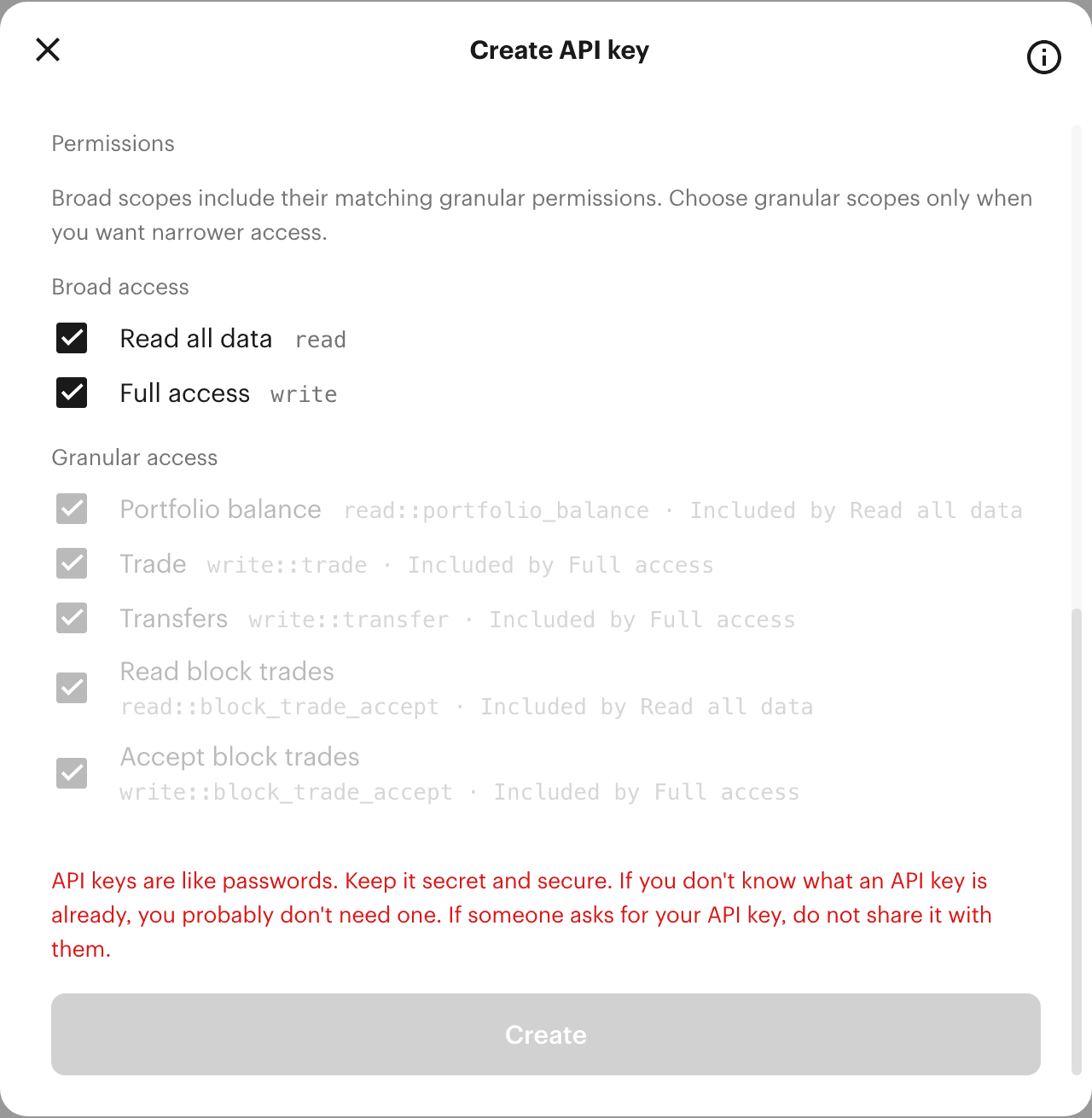
Keys are created under Account & security, in the API keys section. As captured on October 8, 2026, the Create API key dialog opens with the key type set to Ed25519, “Recommended,” and with both Read all data and Full access checked; Full access includes Trade and Transfers. A key that only reads keeps Read all data and has Full access unchecked. Kalshi’s dialog defaults to Ed25519; Realize connects with either RSA or Ed25519 keys.
Each request is signed over the millisecond timestamp, the method and the full path, /trade-api/v2/portfolio/fills rather than /portfolio/fills, with the query string left out of the signature and kept on the URL. An Ed25519 key signs that string directly; an RSA key signs it with RSA-PSS over SHA-256. Lists are cursor-paged, 1 to 1,000 rows a page. Most requests cost 10 tokens against the read budget, and a 429 carries no Retry-After header, so a cursor walk backs off on its own clock.
How Realize pulls it
What Realize reads from Kalshi.
Realize connects read-only and pulls the raw API data rather than an export:
- Every fill from both
/portfolio/fillsand/historical/fills, with the archive read again whenever a pause could have let fills cross the cutoff. - Every live settlement, and the result of any market whose settlement has aged out, from
/historical/markets. - The daily close of every market held on December 31, from the live or historical candlestick route.
From those it matches lots first in, first out and prices the year under each common treatment, whichever route a return uses. The same year, in dollars, is on Kalshi taxes, and a quick range is on the Kalshi tax calculator.
FAQ
Kalshi trade history, answered.
How do I export my Kalshi trade history as a CSV?
Two files come straight from the app. The Documents page (kalshi.com/account/taxes) downloads a yearly zip holding one CSV of closed lots with profit and loss. The Your activity page downloads Kalshi-Recent-Activity-All.csv for any date range, a ledger of orders, trades and settlements with columns for deposits, withdrawals and credits. The API serves every fill, split between a live and a historical endpoint.
Where is my Kalshi transaction history?
On the Your activity page in Kalshi’s account menu (kalshi.com/account/activity), filterable by deposit, withdrawal, order, trade, settlement and credit. Its download icon exports the same history as a CSV for a range from Today to All time, or for custom dates.
Does the Kalshi P&L export include open positions?
No. Kalshi’s Documents page says its figures reflect realized profit and loss from closed positions, and the CSV has one row per closed lot. A position still open on December 31 is not in that year’s file, at any price.
Why does my Kalshi API history stop a few months back?
Kalshi moves fills older than a cutoff from GET /portfolio/fills to GET /historical/fills, and the cutoff advances over time. Reading only the live endpoint returns the recent window with no error. GET /historical/cutoff reports the boundary, in its trades_created_ts field.
Is Kalshi settlement revenue in dollars or cents?
Cents. Kalshi’s Get Settlements reference gives revenue as an integer number of cents, while fee_cost and the YES and NO total costs are fixed-point dollar strings. Fills report fee_cost in dollars too.
Where do I get a December 31 price for an open Kalshi position?
Not from the P&L statement or any form. Kalshi’s Get Market Candlesticks endpoint serves a daily (1440-minute) candle for each market; a market settled before the historical cutoff is served from the historical candlestick route instead.
Sources13 documents
Where each fact comes from.
Every figure above links to one of these, read on the date shown.
- Kalshi account Documents page (logged in) Checked October 8, 2026
- Kalshi account: Your activity (signed in) Checked October 8, 2026
- Kalshi API docs: Historical Data Checked October 8, 2026
- Kalshi Help Center: What tax documentation does Kalshi provide? Checked October 8, 2026
- Kalshi Fee Schedule (PDF), effective July 7, 2026 Checked October 8, 2026
- Kalshi API docs: Get Fills Checked October 8, 2026
- Kalshi API docs: Get Settlements Checked October 8, 2026
- Kalshi API docs: Fixed-Point Representation Checked October 8, 2026
- Kalshi API docs: Get Market Candlesticks Checked October 8, 2026
- Kalshi API docs: API Keys Checked October 8, 2026
- Kalshi account: Account & security, API keys (signed in) Checked October 8, 2026
- Kalshi API docs: Rate Limits Checked October 8, 2026
- 26 U.S.C. §1256: Section 1256 contracts marked to market Checked October 8, 2026
Also on Realize
The rest of the Kalshi record.
What Kalshi reports, what it charges, and how a year is taxed.
Get your Kalshi tax forms.
Connect Kalshi read-only and Realize builds the forms from your full trade history.